Renew DSTV or GOtv online before the match starts
How to renew DSTV or GOtv online with your smart card or IUC number, check the account name first, and clear an E16 error if the screen stays off after paying.
4 min read
It is 7:40, the match is at 8, and the TV has an E16 on it. The subscription ran out sometime this afternoon, which is when subscriptions run out. Renewing from your phone works fine at 7:40 if you have the right number and the decoder is switched on while you pay. Both are easy to get wrong in a hurry.
Find the number on the decoder
DSTV calls it the smart card number and GOtv calls it the IUC number. Either way it identifies the decoder, so it is the number you pay against.
On older DSTV decoders it is printed on the smart card that sits in the slot. Newer ones carry it on a sticker underneath, and on most models the information page in the decoder's menu shows it too. On GOtv, the IUC number is on the sticker on the underside of the decoder, and the information page on screen shows it as well.
If you have renewed before, it is also on the old receipt, which saves you lying on the floor with a phone torch.
Whose name is on the account?
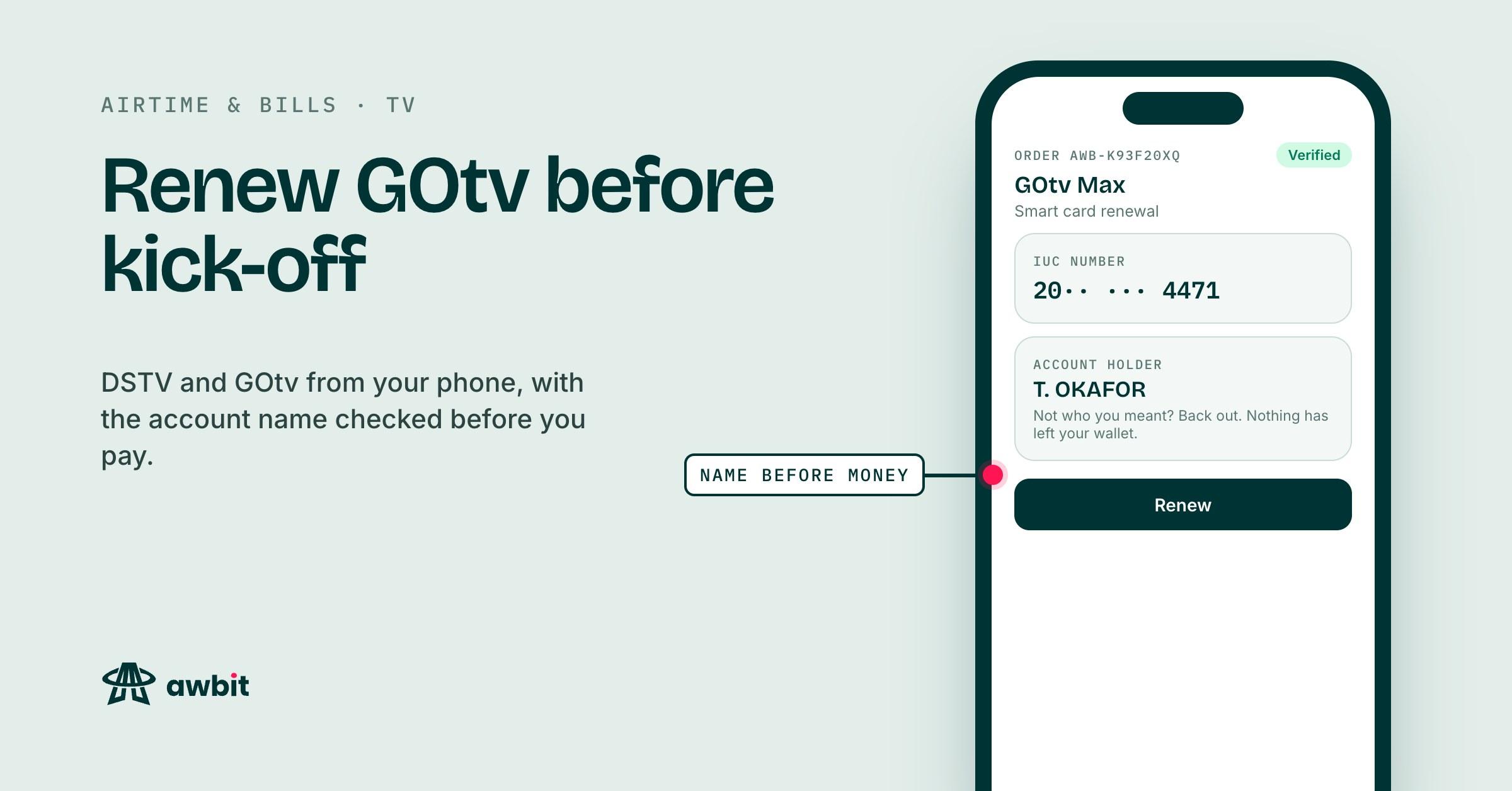
On Airtime & bills, you pick DSTV or GOtv and type the number, and it is checked with the provider before you can pay. The account holder's name comes back to your screen while your wallet is still untouched.
The name is whoever registered the decoder. Your uncle who bought it in 2019 is fine. A stranger means a digit is wrong, so back out and type it again. Nothing has left your wallet.
A renewal that goes through is final. The refund policy treats a renewal delivered to the smart card you entered like any other completed bill payment. If you pay against a stranger's card, their screen comes on and yours stays on E16, and Awbit can't pull the money back.
Paying with the decoder switched on
Pick the package from the list. The price beside it is what leaves your wallet, at face value, with nothing added.
Before you tap pay, make sure the decoder is on at the wall. GOtv's own FAQ asks customers to switch the decoder on before paying, and DSTV's instructions for clearing errors start with the decoder powered on. The activation reaches the decoder through the same signal as the channels, so a decoder that was off when the payment landed can sit on E16 after you switch it back on.
The renewal comes back on your order page as soon as the provider answers. That is usually quick and occasionally not. If the provider rejects the payment, the charge goes back to your wallet, and the credit shows in your transaction history with the order number on it.
Still on E16 after paying
Open the order on Awbit before you do anything else. If it failed, the money is back in your wallet and the provider never got paid, so there is nothing to clear and you need to renew again. If it shows completed, DSTV or GOtv has the payment and your decoder needs the signal sent again.
Awbit can't send that signal. Only DSTV or GOtv can, and each has a way for you to ask for it.
DSTV
DSTV Nigeria's help pages describe a self-service route. Log in on the DSTV website or app, go to Manage account, then Clear error codes, choose the E16 error and press Clear error. Keep the decoder on. DSTV says to allow about 15 minutes for the error to clear.
The same page says to clear E16 only once enough has been paid for the package, which is the other reason to look at the Awbit order first.
On GOtv, a text message does it
GOtv Nigeria's FAQ says to send an SMS with the word RESET and your IUC number to 44688, with the decoder switched on. Shortcodes do change, so if that one bounces, the current number is on GOtv's FAQ page.
If the screen is still on E16 after that, call the provider's customer care with the smart card or IUC number and the time you paid. The time is on the Awbit order. Startimes has its own steps for this, and its customer care can take you through them.
A saved smart card for next month
After the first renewal, the smart card is saved. Next month the number you typed is waiting there, so you pick it instead of going back under the decoder.
Every renewal also stays in your order history for good, with its order number. That helps when you are on the phone with customer care and they ask when you last paid and how much.
Showmax renews from the same place. There is no decoder involved, so none of the E16 business above applies to it.
When the reminder email comes
For a TV package bought on Awbit, Awbit emails you about a day before the 30-day cycle ends. It counts the 30 days from the day the payment went through on Awbit.
It works from that payment date. If DSTV or GOtv shows a different due date on your account, theirs is the one that decides when the screen goes dark. The reminder can't see renewals made anywhere else, so if you paid at a DSTV office or through a bank app in between, ignore it; the email says as much. If you already renewed the same card on Awbit since, it doesn't send one.
It goes out once per cycle and only by email, to the address the account is registered with. If that is an inbox you check once a month, the reminder will be sitting in it after the match has started.